

This looks pretty cool, and it’s got an “0451” reference
19 hours


Creator of Deus Ex Randomizer and other mods: https://mods4ever.com/
This looks pretty cool, and it’s got an “0451” reference
Please don’t suck

all RTX models, and also the GTX 1600 series
it’s all about the mood and ambiance

Black and White 1 has one in progress https://github.com/openblack/openblack
Gallery posts, which is an image post with multiple images in it, compatible with Mastodon and Pixelfed. Check out this example from Mastodon.
“Reposters” as a separate thing from “Bots” with the same Show and Hide options for filtering that bots have. Reposters are more targeted, with higher quality content than true bots and often have a human operator writing comments. However many people find this inauthentic so now they can be filtered out. More details
/c/microblogs can show posts from people you’re following OR all posts.
Recent hashtags shown on the home page sidebar.
Support for receiving posts with jpegxl images.
Communities can have a default hashtag for new posts - posters can edit or remove it if they want.
Option to manually approve posts by new accounts, to cut down on spam while having open registrations (no approval on the new account). This will let people dip their toes in without waiting.
Easily contact other instance admins, see /admin/instances
Vote manipulation detection tools for simple sockpuppets and complex coordinated voting networks. See /admin/voting
Serial downvoter report showing who made lots of downvotes against a single person in a short time.
Other bot detection tools - e.g. easily spot unnatural runs of very quick post creation.
Display list of alts on user profiles to more easily investigate activity by alts.
Filter emoji with keywords rather than importing absolutely everything - this will speed up the emoji reaction dialog.
Identify instances likely to be used by spammers in future. See /admin/instances?filter=liability
Microblog posts with no replies can be automatically deleted - set the MICROBLOG_CONTENT_RETENTION environment variable to how many months you want to keep them for.
git pull
git checkout v1.8.x
Then,
./deploy.sh or ./deploy-docker.sh
PieFed is free and open-source software while operating without any advertising, monetization, or reliance on venture capital. Your donations are vital in supporting the PieFed development effort, allowing us to expand and enhance PieFed with new features.
You can use a subdomain, and I’m pretty sure you can get a subdomain for free. It won’t be pretty but it will do what you want.
https://www.gamingonlinux.com/steam-tracker/
I was hoping the Steam Machine would give a bigger boost, but I guess they haven’t shipped many of them yet
Catodon 26.9.0 - what’s new
docker pull codefloe.com/catodon/catodon:26.9.0
or
docker pull codefloe.com/catodon/catodon:latest
For an existing installation:
docker compose pull
docker compose run --rm web pnpm run migrate
docker compose up -d
Full instructions: https://codefloe.com/catodon/catodon/src/tag/26.9.0-rc.1/docs/install.md#docker Migrating from Sharkey: https://codefloe.com/catodon/catodon/src/tag/26.9.0-rc.1/docs/install.md#migrating-from-sharkey
Please take a db and files backup before migrating! Enjoy =)
:catodon: #catodon
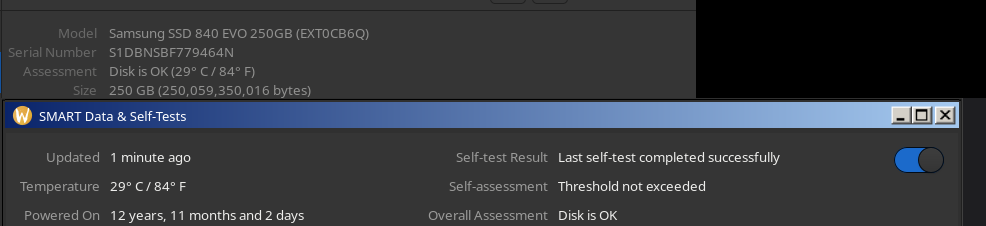
12 years and 11 months of powered-on time for this SSD… I should definitely turn it on for another month lol
10 years powered-on time for this HDD. Who says HDDs aren’t reliable? 😂
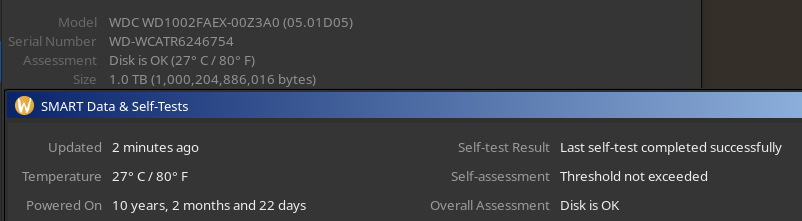
Anyone got better numbers than these?

Yes, in the same way that you don’t typically need to tinker with Linux
In the end they’re not so different, except Windows intentionally does anti-consumer things that make people want to tinker.
“Windows doesn’t require any tinkering, just run this to make a local account, decline 100 requests to use OneDrive and Office 365, get these debloaters, uninstall all these things, and make sure you always tell Windows to not restart your computer while you’re using it every time it updates. And when it does update, you’ll need to run the debloaters again.”







I always thought Crysis 3 did it well, and that came out 13 years ago!
and DOOM 2016